How to Debug a STEM Lesson Plan
A MiddleWeb Blog
 Class is underway and your students are involved in a STEM lesson. Take a close look at their reactions.
Are they interested? Are they engaged? Right up front, assess how the students in your class are responding so you can make quick adjustments today – and use what you learn to strengthen lesson designs throughout the year.
Several possible “fails” may be sabotaging your students’ learning. Check for some common problems using this handy “STEM Lesson Debugger.”
Bug Check 1: Is the challenge interesting and relevant?
 Kids need to be interested and involved in the STEM challenge. The problem they are solving should be a real problem – not one that involves mythical beings, for example. If possible, your kids could generate their own problem, with the caveat that grade-level math and science would be applied to solve it.
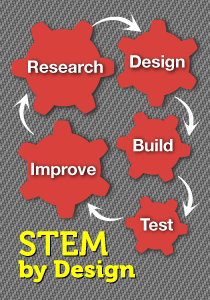
Perhaps they could choose from a list of problems that you see as realistic, doable, and appropriate. You can find more information about STEM Problems your students can address on the STEM by Design Book Website.
Bug Check 2: Does the lesson help them make sense of the science and math they’re learning?
 Kids frequently ask, “Why should I learn this?” Suppose they are using what they are learning to solve a real problem. Suddenly what they are learning has real value.
If they need to understand Newton’s Laws of Motion and use specific algorithms to see if they have improved a roller coaster car, then these concepts become practical and important.
Bug Check 3: Does the lesson use an inquiry-based method of teaching and learning?
 The best STEM lessons use an inquiry approach. The teacher doesn’t tell kids what they’re going to be doing or how to do it. STEM lessons are full of active learning – much of it student-directed. Kids should be in charge of research and decisions about solving the problem.
And the problem should have several “right” solutions, or paths they could follow. During the lesson, students actively plan, construct, and test prototypes in search of workable solutions. Get rid of the “sit and get” approach in your STEM classroom.
Bug Check 4: Do your students feel safe about failing along the way?
 They feel may feel that failing to come up with a working solution will affect their grade. Perhaps they think that failure is always a bad thing in school or that you will disapprove of them if they don’t get it right the first time. Those are definitely ideas you need to debunk.
Help students understand that engineers generally try many times before they find something that works. Getting a perfect solution the first time around is not the idea. Analyzing a solution to see why it failed is often the best learning experience kids can get – certainly better than having someone tell them an answer. Students must feel that their classroom is a safe place.
Bug Check 5: Do students know how to approach problem-solving?
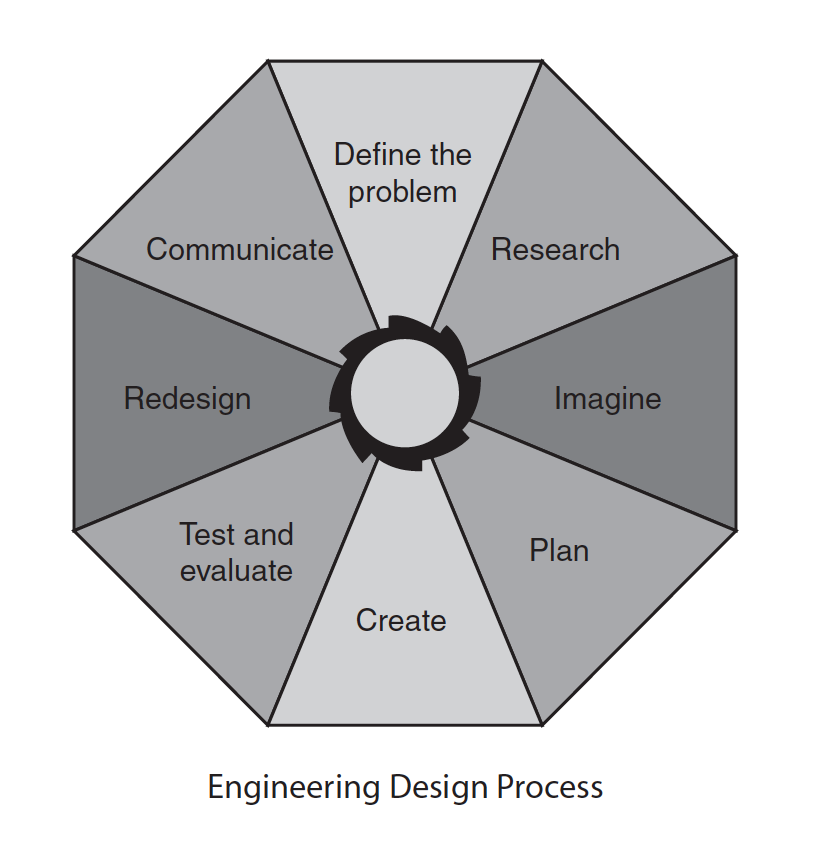 STEM classes teach kids to think like engineers as they tackle and solve problems. Take a look at the Engineering Design Process pictured here. This process is typical of the engineering thought process in STEM lessons. This is not a step-wise or linear approach. Kids can go back and forth between steps, and might use a step more than once (or even skip a step at times).
Science leader Neil DeGrasse Tyson emphasizes the importance of teaching kids how to think and solve problems:
We think of education all too often as, a student walks into a classroom with an empty mind and then you pour stuff into the head, and now they’re educated. And at no time are you actually trained how to think, how to analyze, how to process information, how to judge information.”
STEM lessons push students to use a process that requires them to think creatively, analyze, infer, and evaluate (among other cognitive skills).
Bug Check 6: Are your students able to work successfully in teams?
 In STEM classes students work in productive teams and use constructive teamwork behaviors to solve challenges. That’s a tall order in itself, as our students often tend to be competitive rather than collaborative.
And they may prefer working alone rather than making concessions and working out common solutions. Being on a dysfunctional team can cause a student to tune out and withdraw from the challenge.
I’ve recently revised a Student Teaming Tips handbook, and it’s free on my book website. To get it, scroll to the bottom and download it. Spending some time helping students become productive team members is worth the investment in any class.
Bug Check 7: Do students have time to finish the lesson?
 Most STEM lessons cannot be completed in one class period. It may actually take several periods. These are situations where you have to “go slow to go fast.” Plan where students can successfully end one part of the lesson and pick up during the next class.
A well-executed STEM lesson will address the science and math objectives students are learning, and perhaps some technology objectives as well. So you are not “off track” when teaching a STEM lesson. You are taking the students deeper into specific concepts and objectives.
Bug Check 8: Do students have opportunities to use and create technology?
 STEM identifies technology as any innovation or device created by people to meet a need or want. Students, then, are actually creating technologies when they design prototypes. During their STEM lesson, they may explore the benefits and limitations of different technologies, such as an electrical plants, hydroponic gardens, or genetic engineering.
Students should become more aware of how new technologies are developed and how they affect us. To the extent possible, they should use the newest technologies available to them in STEM work.
Here’s a tool you can download
to remind you of the 8 bug checks!
Once you’ve debugged your lesson, you can fine-tune it
You can make many other adjustments to help STEM lessons go more smoothly. To truly become interested and involved with the lesson, your students need to have confidence that they can be successful. Inspire them with peer role models.
Encourage them to combine materials and ideas in clever and imaginative ways to create solutions. Give them an active and a “safe” environment. And have fun as you lead them through the messy process of creating solutions for real problems.