
5 Essential Tech Tools Keep Teachers Learning
 By Curtis Chandler
The most effective teachers that I know are masterful learners. Somehow, amidst the demands of curriculum, instruction and assessment, they carve out a bit of time each day to gain new knowledge and improve their practice for the benefit of students (Avalos, 2011).
However, too often in my professional development work, I hear educators say something like… “I’m just so busy teaching that I just don’t have time to learn. “
 I find it interesting that no matter how busy we get as educators, we always seem to have just enough time to grab our favorite digital device and play a quick game of Candy Crush or Trivia Crack or to update our Pinterest board.
Truth be told, I myself have indulged in many a mini-game from my phone and gleaned a number of resources and learning activities from other teachers’ Pinterest posts.
But there is a big difference between harvesting the ideas of others and growing your own teaching capacity. Tech-using teachers must spend time curating what’s valuable to their work and creating opportunities to gain new knowledge and understanding.
That’s why whenever I visit a new school, I try to encourage teachers and administrators to utilize their digital devices for professional learning and development, rather than just as tools for streamlining communication and instruction.
To this end, I have assembled a list of five free and often under-utilized technology tools that help turn teachers into more masterful learners. If you’re a savvy tech-using educator, these tools will be familiar. If you’re not, this is the place to start!
Evernote
 Like many teachers, I am always taking notes…and losing them. Sometimes I’m just jotting down a list of things that I need to get done. Other times my notes include new words and possibilities from what I am reading, or perhaps an idea for a new blog post or a learning activity that I want to try out with students.
I’ve tried keeping index cards in my pocket, sticky notes on my laptop, and I’ve even done some writing on the back of my hand.
Regardless of the approach, the result is always the same—my ‘great’ ideas end up lost or illegible or emerge from the laundry as a fuzzy wad of tinted paper from my pants pocket after going through the washing machine.
Evernote makes it easy for educators to take, organize, and access their notes. This free app works from just about any smart device, and allows you to take notes by clipping web-articles, typing, recording audio or taking pictures.
All your Evernote content (“notes”) can be accessed in the cloud from your phone, tablet or lap/desktop computer. Notes can be organized into ‘notebooks’ or by tags, making it easy to find what you are looking for later on through the use of Evernote’s built in search engine. For a free, complete guide on how to get started, check out this this post by Richard Byrne.
 Renowned author and speaker Jim Rohn is credited with saying that ‘we are the average of the five people we spend the most time with.’ Herein lies the power of Twitter. It is a free, simple, and effective tool that grants teachers like me the ability to associate—and stay up-to-date with—an unlimited number of intelligent people…including Jim Rohn himself.
Teachers and administrators simply sign up for Twitter, start following a few of their colleagues and favorite educational gurus, then check Twitter from time to time to see what’s on the minds of people they are following. Twitter also allows educators to engage in conversations around particular topics, to ask questions, and to share their own ideas and resources. For more ideas on how teachers can use Twitter as tool for professional development, check out Kathleen Morris’ post.
Tweetdeck and Hootsuite
 Teachers need to follow people, but they also need to follow topics. TweetDeck and Hootsuite are two free tools that allow teachers to follow topics through coded words, or hashtags. Hashtags allow teachers to track what everyone is saying on Twitter, whether or not the information comes from someone that they follow. For me, this comes in handy, especially when the people I’m following are too busy to tweet or if they don’t have much to say on a topic that I am interested in.
 Regarding ease-of-use, I have utilized TweetDeck and Hootsuite for quite some time now and find them very comparable. The only significant difference is that Hootsuite works from virtually any internet connected device (phone, tablet or laptop), while TweetDeck only works on the web. For either tool, though, teachers start by signing up for Twitter, then use their Twitter username and password to sign in to TweetDeck or Hootsuite. Next, they choose some hashtags such as #edchat or #edtech to follow, and are ready to roll. For a more thorough walk-through of TweetDeck and Hootsuite and recommendations for other hashtags to follow, be sure to check out Sue Water’s post.
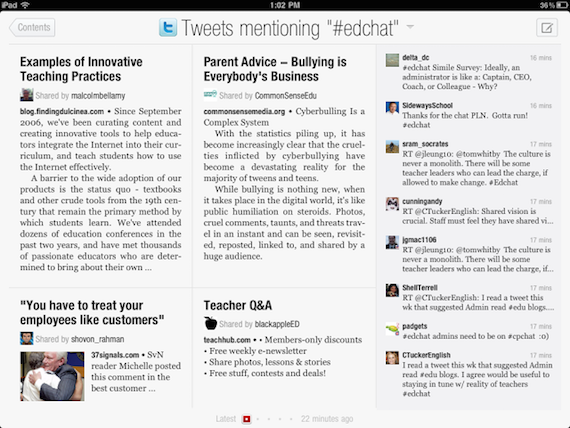
Flipboard shares magazine content and follows social media choices.
I love to read shorter, condensed educational publications that deal with current issues such as Educational Leadership, Instructor, and Ed Week. The problem is that for every article that deals with something that I care about, there are three of four more about something I don’t. That’s why I like Flipboard (above) so much. It’s like having my own free, personal, self-updating magazine that focuses only on the things I am interested in. I can collect articles and information, then make them available to others in the form a shareable magazine.
 To get started, teachers sign up online or download the app on their iPad or smartphone. To create a magazine, just choose a few topics to follow from the homescreen. Flipboard will start sending updates from hundreds of publications immediately. In addition to news, social media feeds can also be added from sites like Twitter and Hootsuite. The best part—it still feels like a real magazine with virtual pages that ‘turn’ as you flick your finger and browse the news.
Smart tech tools help us grow
Educators are busy people. But we are never too old—or too busy—to learn. Good teachers know where to glean ideas. Great teachers, on the other hand, find ways—and tools—to expand their knowledge, professional skills, and learning network.
Dr. Curtis Chandler (@CurtisChandler6) is an education professor at Brigham Young University-Idaho in Rexburg, ID and was the 2011 Kansas Teacher of the Year. “I am a middle school teacher through and through,” he says. “My teaching has been 90% grades 6-8.” At his personal blog, Prescriptions for Education, Curtis explores ways to “help schools ‘get better’ through focused research, practice, & pedagogy.” Above all, he enjoys spending time with his wife and favorite “students”–his four young sons.











Nice list Curtis. Mine would be:
Twitter – my global PLN is an awesome supportive group.
Voxer – like Twitter on Steroids? A smaller, responsive PLN inspire me daily.
Pocket – transitioning away from Evernote I use Pocket to store digital readings and ideas.
Stitcher – podcasts are essential for my development. PD on every commute to & from work.
Feedly – for reading all of the great blogs from the more cerebral teachers out there. Posting comments keeps me on top of my game.