Using Makerspaces to Boost STEM Curiosity
A MiddleWeb Blog
 Recently I learned that a friend’s grandson is entering a STEM-focused middle school, and I decided to investigate the curriculum. One thing really caught my attention. They use makerspaces in their STEM teaching model!
If you’re not familiar with makerspaces, visualize a space filled with an assortment of materials and tools where kids explore ideas together, create, and invent. In this hands-on learning area, kids experiment and come up with new concepts using 3-D printers, cutting tools, craft supplies and other materials.
The more I thought about that, the more I decided that this idea warrants deeper consideration: How could a STEM school make productive use of makerspaces?
What role might “making” play in a STEM school?
Personally, I like to visualize makerspaces as spots that fuel curiosity-driven learning – stimulating spaces that nurture students’ creativity. Curiosity can propel students into wanting to learn – it’s the starting point for fresh ideas and innovations. So, makerspaces could serve as jumpstarters.
When it comes to STEM curriculum, just imagine a class of kids with the space and freedom to muck about and pursue their own innovative and off-the-wall hypotheses. Just think how productive your STEM lessons would be if they were driven by curious kids!
Makerspaces can also be used to kickoff problem-solving for kid’s more elaborate STEM projects. Blend “making” activities with STEM lessons by asking kids to identify one or more real-world questions or problems they are interested in solving. (These might become real-world problems for their STEM lessons.) Then set aside a time for kids to do nothing but tinker with materials and invent possible answers for their questions.
Or teachers may have already decided on a STEM challenge kids will work on (hopefully with input from the kids). Makerspaces could then be set up with a variety of items that kids can use to design and test solutions for this challenge.
A simple example might involve students studying erosion. Using cardboard, clay, foil, tape, and recycled materials, students could design barriers to slow water runoff. During the making process, students would test ideas, redesign prototypes, and discuss which solutions worked best.
How do schools set up makerspaces?
There’s no one right answer to that question, but here are a few logistics to consider:
Start by choosing places in or around your school where students can work together and make things. Basically, grab the largest available spaces and set up tables (if available) and tubs of materials and tools. Don’t worry if the area looks a bit messy. Think of this space as a learning lab for kids. This will be a place where they can check out their own ideas for designing solutions.
 Provide equipment. Kids will need a variety of materials to work with. Begin with items you have on hand such as rulers, aluminum foil, tape, scissors, cardboard, rubber bands, binder clips. twist ties, markers, straws, string and yarn, and recyclables. Consider adding items from crafts stores and hardware stores (field trip?).
Other useful items include LEGO bricks, foam board, wooden dowels. If you send home a list of needed items, chances are parents will donate them. Provide plenty of open-ended materials (with no designated purpose) that allow students to explore multiple possible solutions.
Kids may possibly need tools such as hot glue guns, hole punches, staplers, screwdrivers, small hammers, and so on. Also consider technologies kids might need such as computers, tablets, a 3-D printer, batteries, circuitry, and smart phone cameras. Depending on what kids are working on, also provide science equipment such as safety goggles, gloves, magnifying glasses, balances/scales, timers, and first aid kits.
Keep in mind that the equipment provided varies with the needs of the students. Check out this resource page at the MIT Edgerton Center for lots of ideas.
How do kids use makerspaces?
Once the kids are armed with their questions or problems, step back and give them freedom to tinker, explore, and create. Encourage them to draw pictures or sketches of their designs and discuss possibilities with other students.
 Provide guidance when necessary, but avoid taking over the process. Questions such as “I wonder how we could build this using these materials?” or “What might happen if we changed this part of the design?” encourage students to think and come up with their own answers. If kids get stuck, encourage discussions with peers. Makerspaces naturally create opportunities for collaboration and communication.
Encourage students to be persistent and resilient. Kids will quickly discover that their ideas do not always work the first time – and that’s okay. In fact, failure is often one of their best learning opportunities. Redesigning their solutions teaches them to develop a “fail, fix, and improve” mentality. That will benefit them far beyond STEM lessons.
Note that makerspaces are not intended to substitute for STEM projects. For example, intentionally applying specific grade-level math and science content knowledge is not necessarily part of a maker activity. However, it is a critical part of STEM challenges.
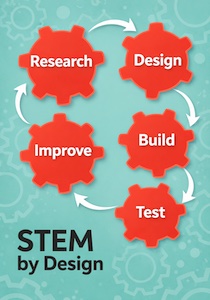
Also note that maker activities and STEM lessons overlap in powerful ways. Maker experiences can generate enthusiasm for upcoming STEM projects, and dovetails nicely with parts of the engineering design process that call for researching, imagining, planning, creating, and improving solutions.
Final thoughts
When schools give students opportunities to tinker, create, test ideas, and solve meaningful problems, classrooms become places of innovation. Makerspaces can help bring that kind of energy into STEM learning – encouraging curiosity, creativity, collaboration, and persistence along the way.
So, cheers to my friend’s grandson and his STEM middle school!
Feature image: Unsplash+. In-story, Kevin Jarrett (CC BY 2.0)
 Anne Jolly began her career as a lab scientist, caught the science teaching bug and was recognized as an Alabama Teacher of the Year during her long career as a middle grades science teacher. From 2007-2014 Anne was part of an NSF-funded team that developed middle grades STEM curriculum modules and teacher PD. In 2020-2021 Anne teamed with Flight Works Alabama to develop a workforce-friendly middle school curriculum and more recently completed an elementary version.
Anne’s bestselling book STEM by Design: Tools and Strategies to Help Students in Grades 4–8 Solve Real-World Problems is now available in a Second Edition (Routledge/Eye on Education, 2025), with lots of new content and fresh teaching strategies. Also visit Anne’s book website, where you’ll find many free resources, including downloadable tools that support every aspect of designing a strong STEM program in your school.